We have new forums at NiteshKothari.com
TopBottom

Did you like this Blog?
Subscribe for my feeds to get updates:


Subscribe Via Email for Free:
TwitterCounter for @milanparmar

Announcement: wanna exchange links? contact me at clwolvi@gmail.com.

How To Upgrade Windows XP To Windows 7

Posted by Milan at 9.17.2009
Share this post:
Ma.gnolia DiggIt! Del.icio.us Yahoo Furl Technorati Reddit

Brief Description

Windows 7 Upgrade Advisor scans your PC to see if it's ready for Windows 7, and tells you about any known compatibility issues.

Overview


Windows 7 Upgrade Advisor scans your PC's system, programs and devices to check if it's able to run Windows 7. After a few minutes, the report will let you know if your PC meets the system requirements, if there are any known compatibility issues with your programs and devices, and will also provide guidance on your upgrade options to Windows 7.

Downloadhere

Labels: ,

Get Google Calender on iPhone

Posted by Milan at
Share this post:
Ma.gnolia DiggIt! Del.icio.us Yahoo Furl Technorati Reddit

Since I've gotten my iPhone, I have tried to sync up as many services as possible with the iPhone's built in email, calendar and contact apps. If you're in a corporate environment, you've probably already setup an email account using the Exchange option on the iPhone.

Unfortunately, you can only add one Microsoft Exchange account to your iPhone, so if you want to sync your Outlook calendar and Google calendar, you have to use CalDAV instead of Google Sync (which uses Exchange).

In this post, I will walk you through the steps for setting up Google Calendar on your iPhone using the CalDAV protocol, which means you can still use the Exchange option for your corporate email.

First, click on the Settings button on your iPhone home screen:

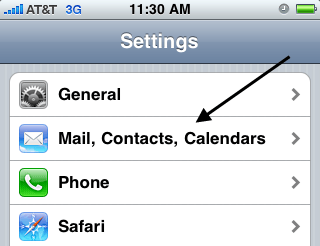
Next, click on the Mail, Contacts, Calendars option under Settings:


Next, click on the Add Account option at the bottom:

Next, click on the last option called Other:

google calendar iphone

Next, click on the Add CalDAV Account option under the Calendars heading:

Almost done! Now, you need to enter your Google account information. In the Server field, enter Google.com. Enter your full email address for the username and type in your Google account password. In the Description field, type in the name for the account that you want.

Tap the Next button at the top of the screen and you're done! Just go to the Calendar application on the iPhone and syncing will automatically start once you open it. If you have any issues, post a comment here and I'll try to help! Enjoy!


credit

Labels: ,

Customize Windows Vista To make it Windows 7

Posted by Milan at 9.16.2009
Share this post:
Ma.gnolia DiggIt! Del.icio.us Yahoo Furl Technorati Reddit


Windows 7 is the next generation operating system by Microsoft.Windows 7 is now at beta stage and will be released at about year 2009-2010.
Now user can try the feeling using 'Windows 7′ by changing the theme of Windows Vista.These are the steps.
Because Windows Vista doesn't allow user to use third-party theme,so user need to patch system files in order to use the third-party theme.User need to patch 3 system files to use third-party theme in Windows Vista.The files are:

  • shsvcs.dll
  • themeui.dll
  • uxtheme.dll

These are the website to download these system files:

For Windows Vista(32bit):http://www.withinwindows.com/uxthemes/Windows%20Vista/SP0/6.0.6000.16386_XX.rar

For Windows Vista(64bit):http://www.withinwindows.com/uxthemes/Windows%20Vista/SP0/6.0.6000.16386_XX_AMD64.rar


For Windows Vista(32bit) Service Pack 1:http://www.withinwindows.com/uxthemes/Windows%20Vista/SP1/6.0.6001.18000_XX.rar


For Windows Vista(64bit) Service Pack 1:http://www.withinwindows.com/uxthemes/Windows%20Vista/SP1/6.0.6001.18000_AMD64_XX.rar


After download the RAR file,extract it using WinRAR(download here) or 7-Zip(download here),you will get the three .dll file.
Highlight that 3 .dll file can right click "Take Ownership" it.

Rename that three .dll file so that user can easily copy the file.Example simply add a "backup" at last of each file name.Such as "shsvcs_backup.dll"

After that go to Windows Explorer type in "%windir%\System32″.

Copy and paste that three 'Take Ownership-ed" .dll file in that folder.

Restart yout system.Now your system is ready to use third-party theme.

Download the third-party Windows 7 theme from:
http://www.mediafire.com/download.php?cod0z1zykoj

or

http://www.megashare.com/523729


Extract the zipped folder.Copy the folder(containing a .theme file and a folder containing .msstyles file) to "%windir%\Resources\Themes\" folder.

Now user can go to Personalize(right click on the desktop),click on "theme" will find a new theme from the drop-down list.Apply it.


Credit


Labels: ,

Google Search Box Is Bigger Now

Posted by Milan at 9.12.2009
Share this post:
Ma.gnolia DiggIt! Del.icio.us Yahoo Furl Technorati Reddit

In a nod toward usability, Google increased the size of its home page’s search box and typeface Wednesday, making it easier for users to see long queries.

“Over the past 11 years, we’ve made a number of changes to our homepage,” Marissa Mayer, the company’s vice president of search products and user experience, said in a blog post. “Some are small and some are large. In this case, it’s a small change that makes search more prominent.”

She acknowledged that it was a simple change but said it “makes our clean, minimalist homepage even easier and more fun to use.”

That didn’t stop the snark from techies who considered it an underwhelming tweak. Search Engine Land’s Matt McGee blogged: “Fresh off of patenting its home page design, Google is throwing caution to the wind and messing with success: It’s making its search boxes bigger. (Gasp!)”

“Google is not just going to let Apple dominate the news today with their new product announcement and Steve Jobs re-appearance on Apple’s stage,” Arnold Zafra wrote on Search Engine Journal.

On Slashgear, Chris Davies wondered whether the change will be widely noticed, since so many Web users search through browser toolbars, mobile applications or Google’s own Chrome browser.

Softpedia’s Lucian Parfeni said the update might be a concession to netbooks, since larger fonts and Chrome itself take advantage of smaller screens. “With Google planning to get into netbooks with its very own, purpose-built operating system, Chrome OS, and netbooks being the perfect home for its suite of web apps, it doesn’t take too much of a stretch of the imagination to say that Google is really interested in the minute mobile computers and that it would modify its homepage to make it easier to use on the small screens,” he said.

Credit

Labels:

Free Tool To Tweak Windows 7

Posted by Milan at 9.11.2009
Share this post:
Ma.gnolia DiggIt! Del.icio.us Yahoo Furl Technorati Reddit


Windows 7 Little Tweaker is a simple windows utility that tweaks,settings and adds a few additional features to Windows 7 menus. Windows 7 Tweaker can disable low disk space warnings, the UAC, speed up Explorer navigation, and do a lot more.


Windows 7 Tweaker is free and can be downloaded from here

Labels: